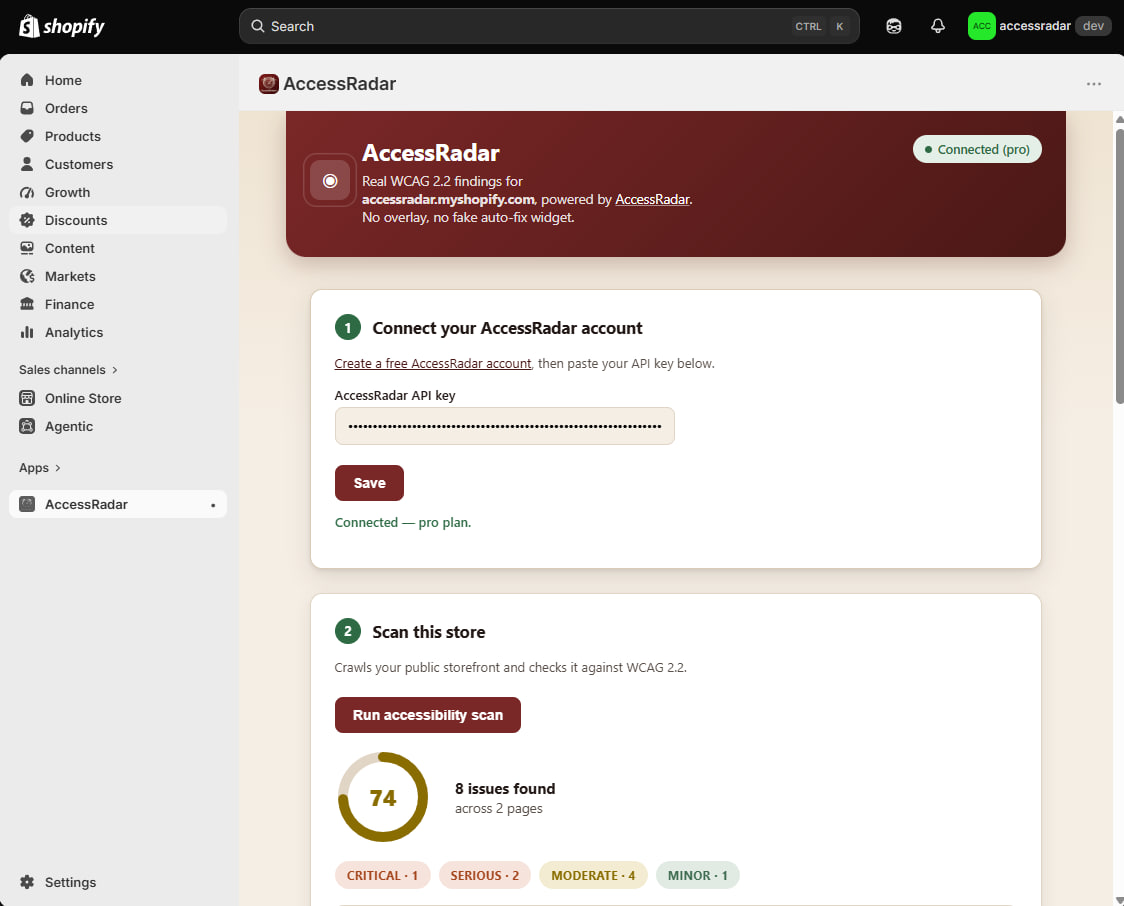
Add AccessRadar to your Shopify store
Scan your storefront for real WCAG 2.2 issues without leaving Shopify admin. No overlay, no fake auto-fix widget - just honest findings on your real markup.
Three steps, five minutes to your first scan.
- 1. Open the install link. Click "Open in Shopify admin" above, or copy the link below and open it while logged into your store's admin.
- 2. Approve the app and connect your key. Approve AccessRadar's custom-app install, then create a free AccessRadar account and paste your API key into the embedded app.
- 3. Run a scan. Click "Run accessibility scan" inside the app - results (score, findings, severity) appear right there in Shopify admin.
Install link
Copy the install link
This is a Shopify custom-distribution link scoped to the AccessRadar app - paste it into your browser while logged into the store you want to protect.
https://admin.shopify.com/oauth/install_custom_app?client_id=3f20bbabbef6e31fb71b38beb7a80c3b&no_redirect=true&signature=eyJleHBpcmVzX2F0IjoxNzg5NDIyNjY5LCJwZXJtYW5lbnRfZG9tYWluIjoiYWNjZXNzcmFkYXIubXlzaG9waWZ5LmNvbSIsImNsaWVudF9pZCI6IjNmMjBiYmFiYmVmNmUzMWZiNzFiMzhiZWI3YTgwYzNiIiwicHVycG9zZSI6ImN1c3RvbV9hcHAiLCJtZXJjaGFudF9vcmdhbml6YXRpb25faWQiOjIzNDQ3NjU1OX0%3D--ba8317eb8eed371f769abbe36922614e9ef3f80e